Knowing how to generate test cases from requirements is what separates coverage you can defend from coverage that merely looks busy. Tests written from the built screen or the ticket describe what was built. Tests generated from agreed acceptance criteria are designed to check what was promised, including the failure and boundary cases nobody demos.
This guide shows the method on one complete worked example, from the original requirement through its acceptance criteria to test cases with steps and expected results, the mapping between them, and what a person must review before approving. It then shows how ReqLens TestCraft does the same work from the same requirement.
Start from the requirement, not the screen
The quality ceiling of any test suite is set by the requirement. A vague requirement produces vague tests no matter who writes them, because there is nothing specific to verify. So the first step of test generation is not writing tests at all. It is checking that every acceptance criterion could actually fail. If you need help with that step, see acceptance criteria examples and a reusable template.
The method in five steps
- Confirm the criteria are testable. Each one states a context, an action and an observable result. Rewrite any that cannot fail.
- Derive tests per criterion. At least one test for each acceptance criterion, plus a test at every boundary and for every failure and permission case.
- Write steps and expected results. Steps a tester can follow without guessing, and expected results that can be seen, not interpreted.
- Map every test to a criterion. Each test names the criterion it verifies. A criterion with no test is a gap; a test with no criterion is either a missing criterion or noise.
- Review and approve. A person checks coverage, expected results and invented details before any test enters the suite.
Worked example: the refund requirement
This is the same example used in the guides on choosing a requirements management tool and acceptance criteria.
Requirement: As a customer, I want to request a refund for a card payment, so that I get my money back for an order I no longer want.
The business rules R1 to R5 are assumptions added to make the example testable, and the test cases below were written by hand to demonstrate the method. They are not ReqLens output. In a real project, each rule is confirmed by the Product Owner first.
Business rules (illustrative): R1. Refunds can be requested within 30 days of delivery. R2. The refund goes back to the original card only. R3. A customer can refund only their own orders. R4. An order that has already been fully refunded cannot be refunded again. R5. Refunds above a configured amount need approval from a support agent; refunds at or below that amount do not.
Acceptance criteria:
- AC-01 Given a delivered order within 30 days, when the customer requests a refund, then a refund request is created and the customer sees its status.
- AC-02 Given an order delivered more than 30 days ago, when the customer requests a refund, then the request is refused with the reason shown.
- AC-03 Given an approved refund, when it is processed, then the amount is returned to the original card and not to any other method.
- AC-04 Given an order that belongs to another customer, when a customer requests a refund, then the request is refused and no order details are revealed.
- AC-05 Given a fully refunded order, when a refund is requested again, then it is refused.
- AC-06 Given a refund above the configured amount, when it is requested, then it waits for support agent approval before processing.
The resulting test cases (illustrative)
TC-01 Refund within the window (verifies AC-01, happy path)
- Precondition: signed-in customer with an order delivered 10 days ago, paid by card.
- Steps: open the order; select "Request refund"; confirm.
- Expected: a refund request is created and the order shows the status "Refund requested".
TC-02 Last allowed day (verifies AC-01, boundary)
- Precondition: order delivered exactly 30 days ago.
- Steps: request a refund for the order.
- Expected: the request is accepted, as in TC-01.
TC-03 First day outside the window (verifies AC-02, boundary)
- Precondition: order delivered 31 days ago.
- Steps: request a refund for the order.
- Expected: the request is refused and the message states that the 30-day refund window has passed.
TC-04 Refund goes to the original card (verifies AC-03)
- Precondition: an approved refund for an order paid with a card ending 4242.
- Steps: process the refund; open the refund record.
- Expected: the refund is recorded against the card ending 4242, and no other refund method is offered or used.
TC-05 Payment provider rejects the refund (verifies AC-03, failure)
- Precondition: an approved refund; the payment provider is set to reject it.
- Steps: process the refund.
- Expected: the refund shows as failed, no amount is recorded as returned, and support is alerted.
TC-06 Another customer's order (verifies AC-04, permission)
- Precondition: customer A is signed in; an order belongs to customer B.
- Steps: request a refund for customer B's order, for example through its direct link.
- Expected: the request is refused, and no details of customer B's order are shown.
TC-07 Second refund of a refunded order (verifies AC-05)
- Precondition: an order that has already been fully refunded.
- Steps: request a refund again.
- Expected: the request is refused and the message states that the order is already refunded.
TC-08 Refund above the approval amount (verifies AC-06)
- Precondition: the approval amount is configured; an order total above it.
- Steps: request a refund.
- Expected: the request shows "Awaiting approval" and is not processed until a support agent approves it.
TC-09 Refund exactly at the approval amount (verifies AC-06, boundary)
- Precondition: an order total exactly equal to the configured amount.
- Steps: request a refund.
- Expected: the request is processed without waiting for support agent approval, because R5 requires approval only above the amount.
Mapping criteria to tests
| Criterion | Tests | Paths covered |
|---|---|---|
| AC-01 | TC-01, TC-02 | Happy path, boundary |
| AC-02 | TC-03 | Boundary |
| AC-03 | TC-04, TC-05 | Rule, failure |
| AC-04 | TC-06 | Permission |
| AC-05 | TC-07 | Rule |
| AC-06 | TC-08, TC-09 | Rule, boundary |
Every criterion has at least one test, and every test names its criterion. TC-08 and TC-09 together pin the approval boundary: just above the amount needs approval, exactly at it does not.
What a person should review, edit and approve
Whether tests are written by hand or generated, a person owns the result. Before approving, check:
- Every criterion has a test, and every test names the criterion it verifies.
- Boundaries are exact: day 30 and day 31, at the threshold and just above it, not only "inside" and "outside".
- Expected results are observable: a status, a message, a record. Not "works correctly".
- Failure and permission cases exist, not just the happy path.
- Nothing is invented: no business rule appears in a test that is not in the requirement or confirmed by the Product Owner.
- Test data is realistic and specific, such as the delivery date and card used.
- Duplicates are removed, and each test earns its place.
Edit anything that fails these checks, reject tests that do not belong, and approve the rest. Approval is what turns a proposal into part of your suite.
How ReqLens TestCraft generates tests from the same requirement
TestCraft does this work from the elaborated requirement, and keeps a person in charge of every decision. For plans, exports and access, see the ReqLens AI test case generator.
- Elaborate first. In Requirement Studio, the refund story becomes a structured requirement with acceptance criteria and coverage gaps. See the Requirement Studio guide.
- Select the scope. A requirement, a feature from the decomposed backlog, or a set of use cases.
- Review the proposed suite. TestCraft returns test cases with preconditions, steps and expected results. Each case is linked to the acceptance criterion it verifies (AC-01, AC-02 and so on), and priority is assigned by a rule engine rather than guesswork.
- Approve, edit or reject case by case. Every case starts as a draft. Generated cases remain drafts until reviewed and approved, and your edits are what gets stored.
- Generate test data for cases that need it.
- Execute or export. Run the suite in TestExecute with results traced back to each criterion, or export to Excel, CSV, TestRail, Xray, Zephyr or Gherkin.
Actual ReqLens output for the refund example
Everything in this section is real ReqLens output, captured on 28 September 2026. It is kept separate from the handwritten example above on purpose.
What went in. The refund story plus the same illustrative business rules R1 to R5, entered as the requirement text in Requirement Studio. Nothing else was provided.
- ReqLens numbers this requirement's acceptance criteria ac-1 to ac-10. They are not the same as AC-01 to AC-06 in the handwritten example. For instance, ReqLens ac-4 is the approval threshold.
- TestCraft generated 39 test cases. For this demo, the review was performed by an AI assistant, which checked each case against R1 to R5 and approved 12 and rejected 27. No person reviewed or approved these cases.
- No tests were executed. The requirement itself is not approved: it still has open coverage gaps and a hard block, and coverage is incomplete.
- The first four screenshots show the state before review; the coverage report shows the state after review.
1. Elaboration: criteria and readiness
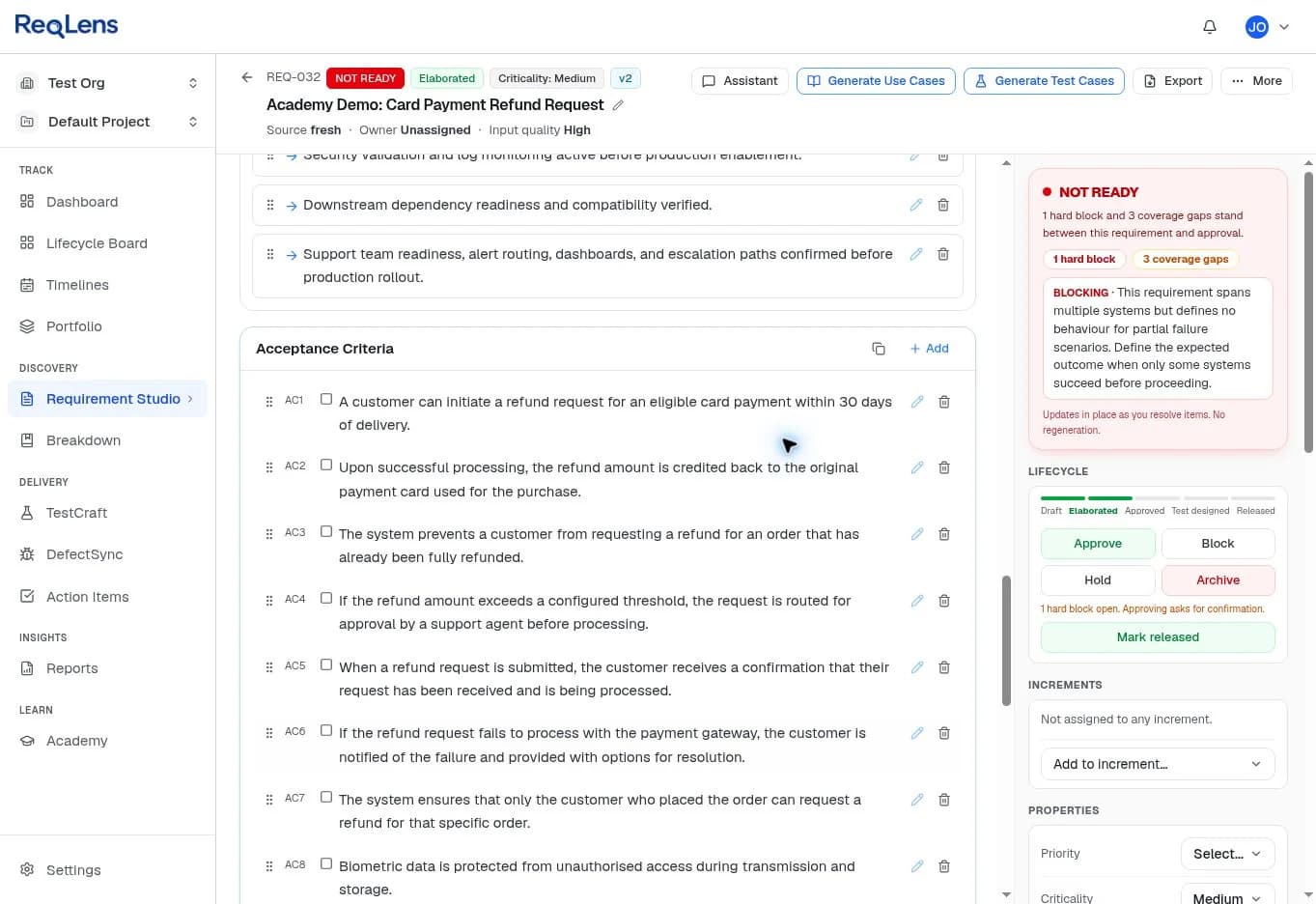
Requirement Studio turned the story and rules into proposed acceptance criteria. Most map directly to the rules: the 30-day window (ac-1), refunds to the original card (ac-2), no second refund of a fully refunded order (ac-3), agent approval above the threshold (ac-4) and only the order placer requesting a refund (ac-7). It also proposed criteria that do not belong to a refund story, such as biometric data protection and credential storage. That is exactly what review is for.
2. Coverage gaps and the decision that blocks approval
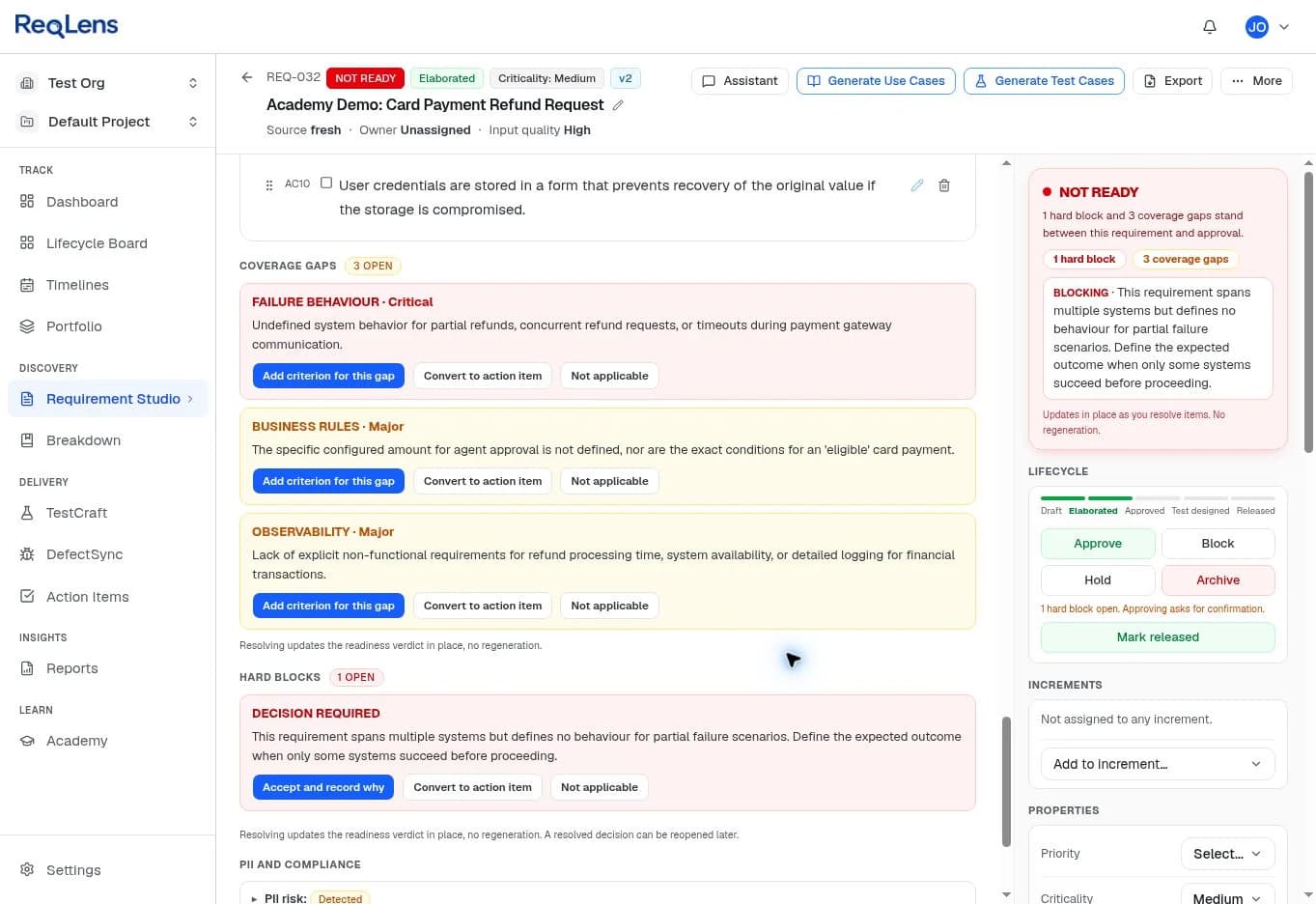
ReqLens flagged what R1 to R5 do not answer: behaviour for partial refunds, concurrent requests and payment gateway timeouts; the actual approval amount and what makes a payment eligible; and observability. The hard block asks for a decision the rules never made: what should happen when only some systems succeed. Until someone resolves these, the requirement cannot be approved.
3. Generated test cases, linked to criteria
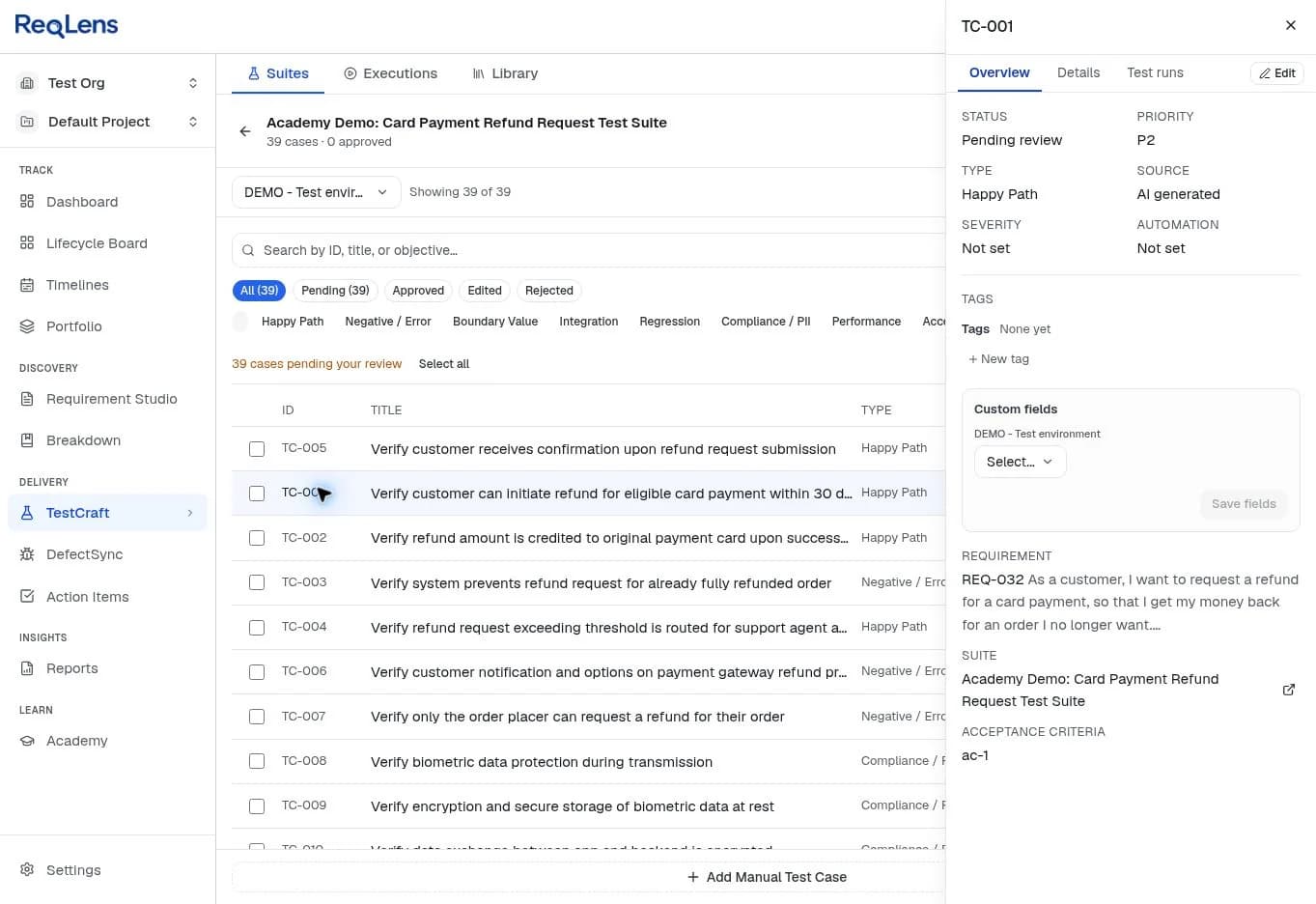
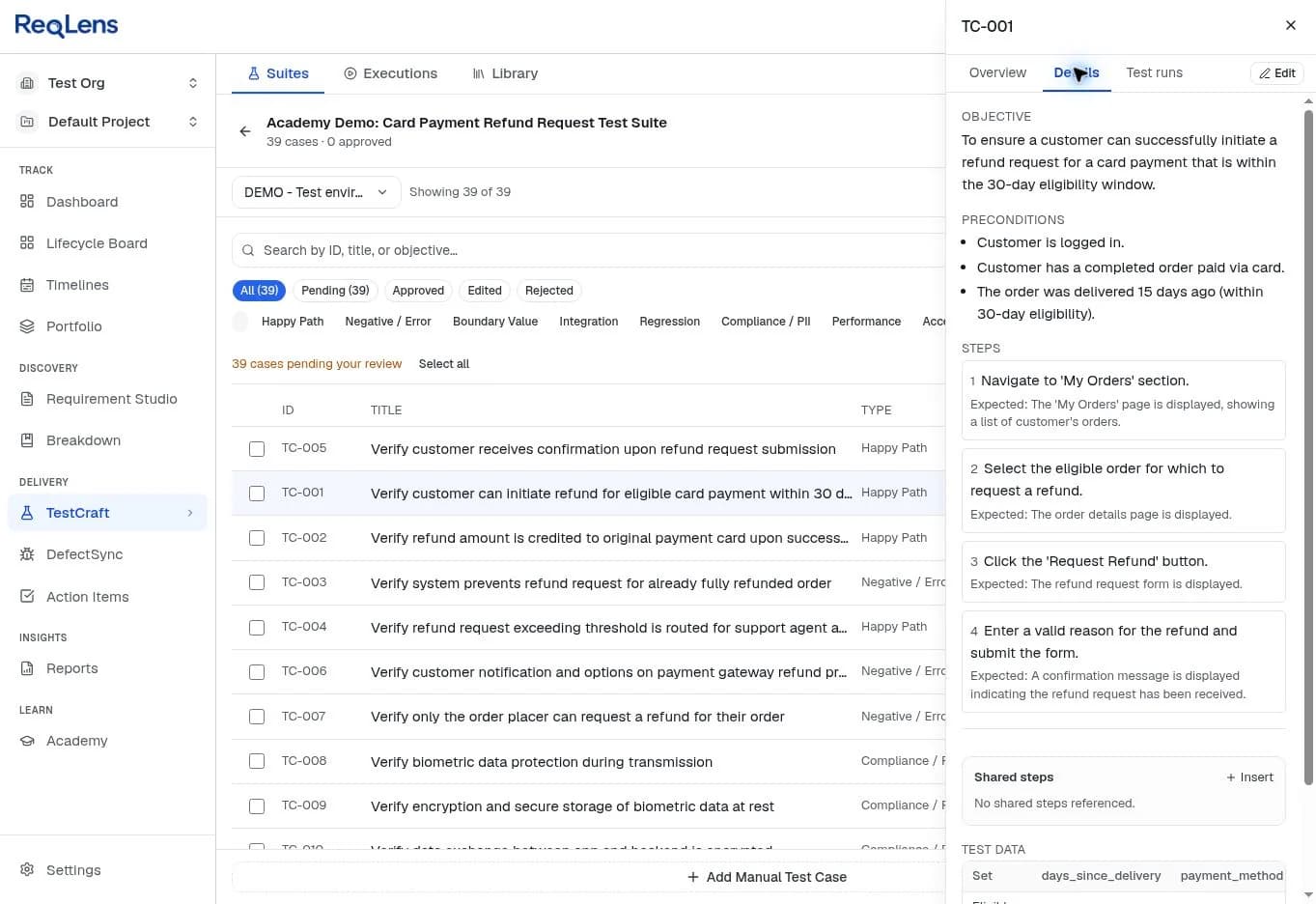
Among the 12 cases the AI assistant approved are the refund scenarios that matter most, including the boundaries:
| Case | Linked criterion | What it checks |
|---|---|---|
| TC-001 | ac-1 | Refund requested 15 days after delivery is accepted |
| TC-012 | ac-1 | Delivered exactly 30 days ago: request is accepted |
| TC-013 | ac-1 | Delivered 31 days ago: refund is not allowed |
| TC-002 | ac-2 | Refund is credited to the original payment card |
| TC-003 | ac-3 | A fully refunded order cannot be refunded again |
| TC-007 | ac-7 | Only the customer who placed the order can request a refund |
| TC-004 | ac-4 | $150 against a $100 threshold waits for agent approval |
| TC-014 | ac-4 | Exactly $100 is processed without approval, matching R5 |
| TC-015 | ac-4 | $99.99 is processed without approval |
TestCraft export of the 12 approved refund cases (Excel), with every step, expected result, linked criterion and test data set. It is the native TestCraft Excel export with one correction: the requirement ID in the Source Reference column reads REQ-032, matching the app, because of a known export numbering issue that is being fixed. Nothing else was changed.
Here is TC-014 exactly as TestCraft generated it:
- Precondition: customer logged in with an eligible order; approval threshold configured to $100.
- Step 1: Initiate a refund request for an amount of $100 (exactly at threshold). Expected: a confirmation message is displayed indicating the refund request has been received and is being processed directly, without pending approval.
- Step 2: Log in as a Support Agent to the Customer Service Portal and check the 'Refund Approvals' queue. Expected: the refund request for $100 is not listed in the 'Pending Approval' queue.
4. What review changed, and what still needs a person
In this demo the AI assistant did the review; in real use, a person on your team should. The 27 rejected cases include the ones generated from criteria that do not apply to a refund story, such as biometric data protection (TC-008 and TC-009 in the suite above are not in the approved set). Review also surfaces details a person must still confirm or edit before execution:
- Generated specifics. The $100 threshold, the "Customer Service Portal" and the "Refund Approvals" queue are plausible details TestCraft filled in. They must match your real configuration and screens.
- Ambiguous expected results. TC-013 expects the refund button to be "disabled or not visible, or an error message". A reviewer should pick the one correct behaviour, so the test cannot pass two different ways.
- Open gaps and the hard block. The partial-failure decision and the undefined business rules from step 2 still need answers, and may add criteria and tests.
5. Traceability after review
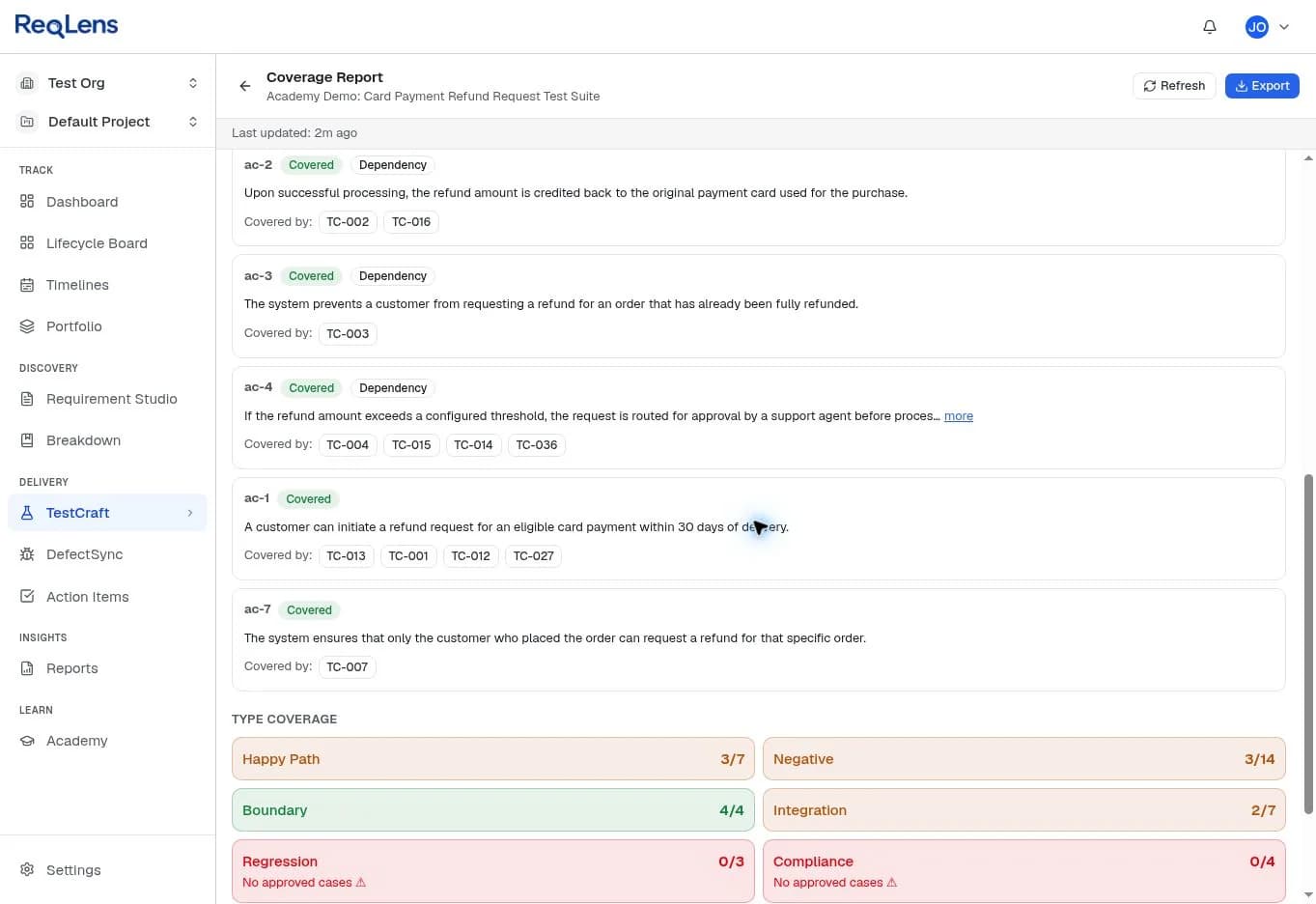
After review, the coverage report shows each criterion with the approved tests that cover it, so a Delivery Manager can see what is covered and what is not. In this demo, all four generated boundary cases were approved, while regression and compliance have no approved cases yet. The next steps would be resolving the open gaps, approving the requirement, and running the suite in TestExecute so results trace back to each criterion. None of that was done for this demo.
Reading coverage honestly
A coverage percentage is only as honest as what it counts.
| What gets counted | What it actually tells you |
|---|---|
| Test cases written | Volume of work, nothing about risk |
| Requirements with at least one test | Whether anything is completely untested |
| Acceptance criteria with a mapped test | Whether the criteria have planned test coverage |
| Boundary, failure and permission paths covered | Whether the failure modes are tested, not just the happy path |
Report the last two. The requirements traceability matrix is where that view lives, from requirement to criteria, tests, results and defects.
Key takeaways
- Generate tests from agreed acceptance criteria, not from the built screen.
- Give every criterion at least one test, plus explicit boundary, failure and permission cases.
- Map each test to the criterion it verifies; gaps and orphans both mean something.
- A person reviews and approves every test before it enters the suite.
To see how ReqLens fits your team's workflow and plan, compare ReqLens plans.