AI test case generator
AI test case generator that links every case to the criteria it is designed to test
ReqLens TestCraft generates test cases from acceptance criteria, with preconditions, steps, expected results and test data. Every case starts as a draft for your team to review, and stays linked to its criterion through execution and export.
Sign-up required. The Free plan includes 3 TestCraft suites per month.
How it works
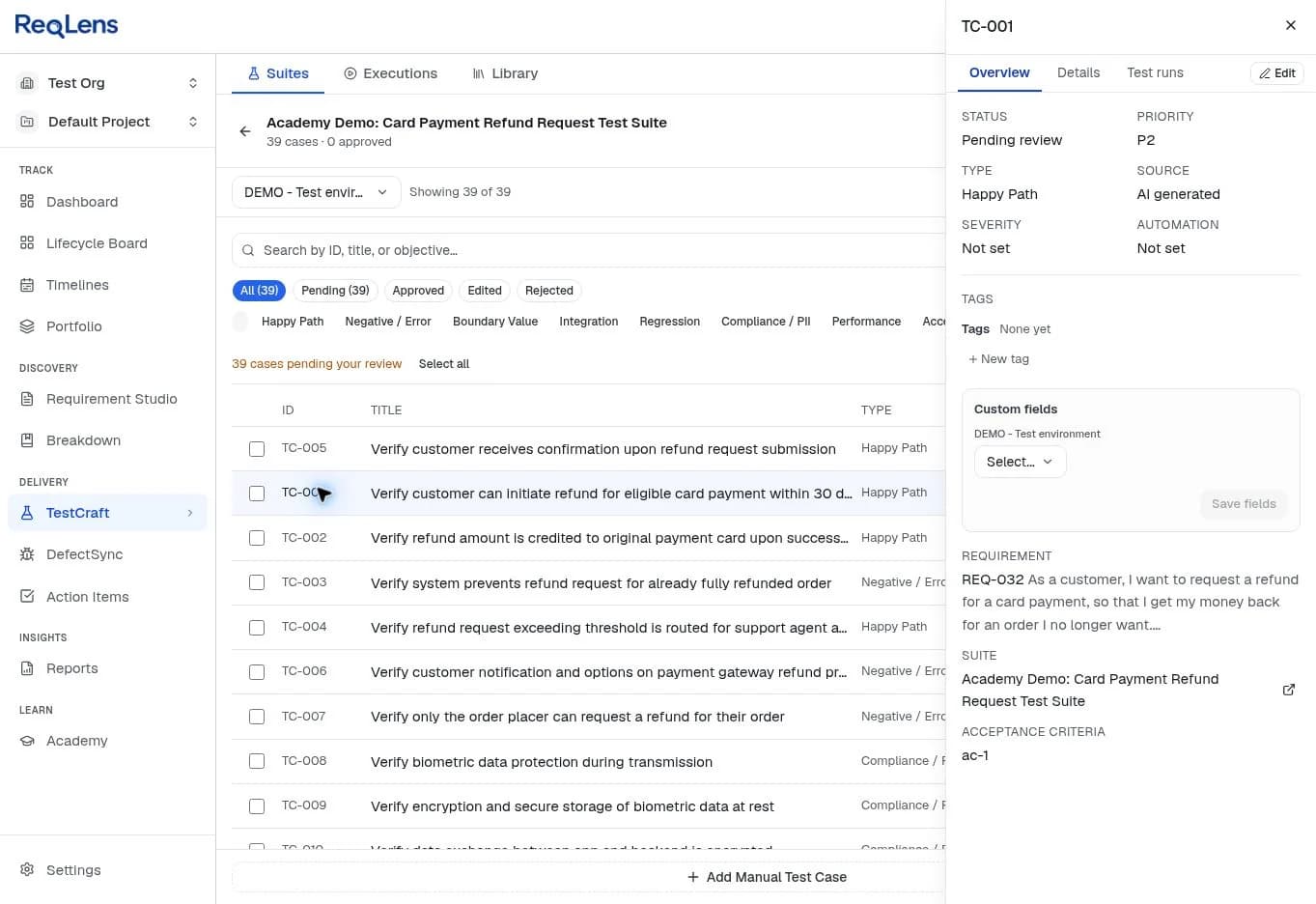
From acceptance criteria to a reviewed test suite
Step 1
Start from acceptance criteria
Generate from a requirement your team has elaborated in Requirement Studio or imported from Jira or Azure DevOps. The numbered criteria are what each case will be designed to test.
Step 2
Generate a draft suite
TestCraft proposes happy path, negative, boundary and integration cases, each with preconditions, numbered steps, expected results, a priority and the criterion it covers.
Step 3
Review case by case
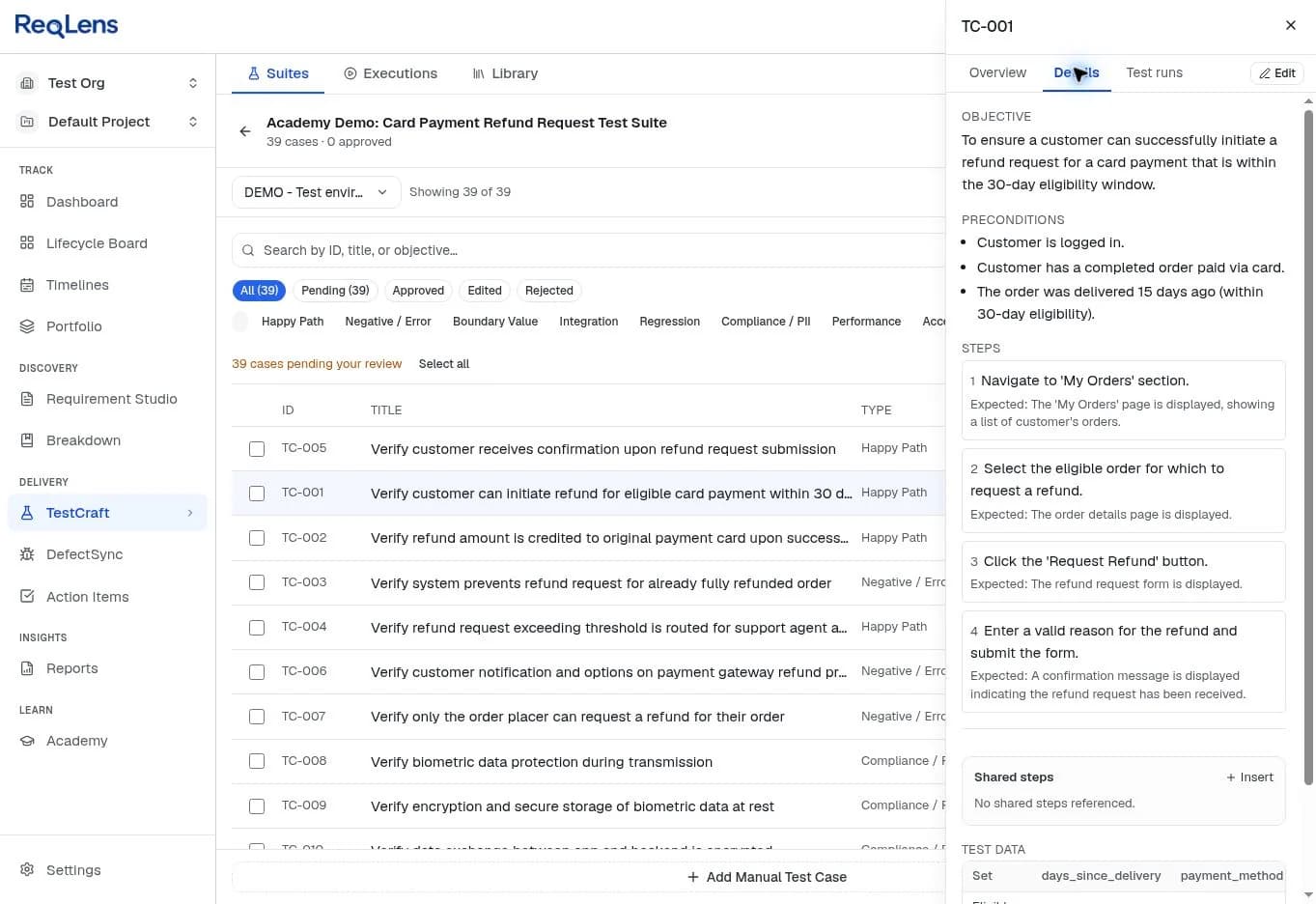
Every case starts as a draft. Your team approves, edits or rejects each one, and only approved and edited cases count towards coverage and exports.
Step 4
Run or export
Run the approved suite in TestExecute with results traced back to each criterion, or export it to Excel, CSV, TestRail, Xray, Zephyr or Gherkin.
Worked example
A real TestCraft run on a refund requirement
The input, one generated case in full, and a selection of the approved suite, copied from the TestCraft export.
Input
As a customer, I want to request a refund for a card payment, so that I get my money back for an order I no longer want.
Acceptance criteria used for generation (summarised)
- ac-1 Refunds can be requested within 30 days of delivery
- ac-2 Refunds are credited to the original payment card
- ac-3 A fully refunded order cannot be refunded again
- ac-4 Refunds above a configured threshold need support agent approval
- ac-7 Only the customer who placed the order can request a refund
Generated case TC-001
Verify customer can initiate refund for eligible card payment within 30 days
Happy Path · P2 · designed to test ac-1
Preconditions
- Customer is logged in.
- Customer has a completed order paid via card.
- The order was delivered 15 days ago (within 30-day eligibility).
Test data
Eligible card payment within 30 days (expected outcome: pass)
days_since_delivery=15; payment_method=card; order_status=delivered
| Step | Action | Expected result |
|---|---|---|
| 1 | Navigate to 'My Orders' section. | The 'My Orders' page is displayed, showing a list of customer's orders. |
| 2 | Select the eligible order for which to request a refund. | The order details page is displayed. |
| 3 | Click the 'Request Refund' button. | The refund request form is displayed. |
| 4 | Enter a valid reason for the refund and submit the form. | A confirmation message is displayed indicating the refund request has been received. |
| Case | Criterion | Type | Title | Test data |
|---|---|---|---|---|
| TC-001 | ac-1 | Happy Path | Verify customer can initiate refund for eligible card payment within 30 days | Eligible card payment within 30 days |
| TC-012 | ac-1 | Boundary | Verify refund request for payment delivered exactly 30 days ago | Order delivered exactly 30 days ago |
| TC-013 | ac-1 | Boundary | Verify system rejection of refund request for orders outside the 30-day window | Order delivered 31 days ago (outside window) |
| TC-002 | ac-2 | Happy Path | Verify refund amount is credited to original payment card upon successful processing | Hint: Simulate successful payment gateway processing. |
| TC-003 | ac-3 | Negative | Verify system prevents refund request for already fully refunded order | Order already fully refunded |
| TC-004 | ac-4 | Happy Path | Verify refund request exceeding threshold is routed for support agent approval | Refund amount exceeds threshold |
| TC-014 | ac-4 | Boundary | Verify refund request for amount exactly at approval threshold | Refund amount exactly at threshold |
| TC-007 | ac-7 | Negative | Verify only the order placer can request a refund for their order | Order placer requests refund; Different customer requests refund |
Review status of this sample
TestCraft generated 39 cases for this requirement. For this demonstration the review was performed by an AI assistant, which checked each case against the refund business rules, approved 12 and rejected 27. No person reviewed or approved these cases, no tests were executed, and the requirement itself is not approved: it still has open coverage gaps.
Download the TestCraft export of the 12 approved cases (Excel) with every step, expected result, linked criterion and test data set.
Human review
What your team still reviews before a case is approved
Generation is a first draft, not a decision. In the refund sample, review surfaced what a person must confirm: specifics TestCraft filled in, such as a $100 approval threshold and the name of an agent approval queue, which must match your real configuration and screens; an expected result that allowed two different outcomes; and cases generated from criteria that did not belong to a refund story at all.
That is why every case starts as a draft and is approved, edited or rejected one at a time, and why only approved and edited cases reach coverage and exports.
Coverage
See which criteria have approved tests, and which do not
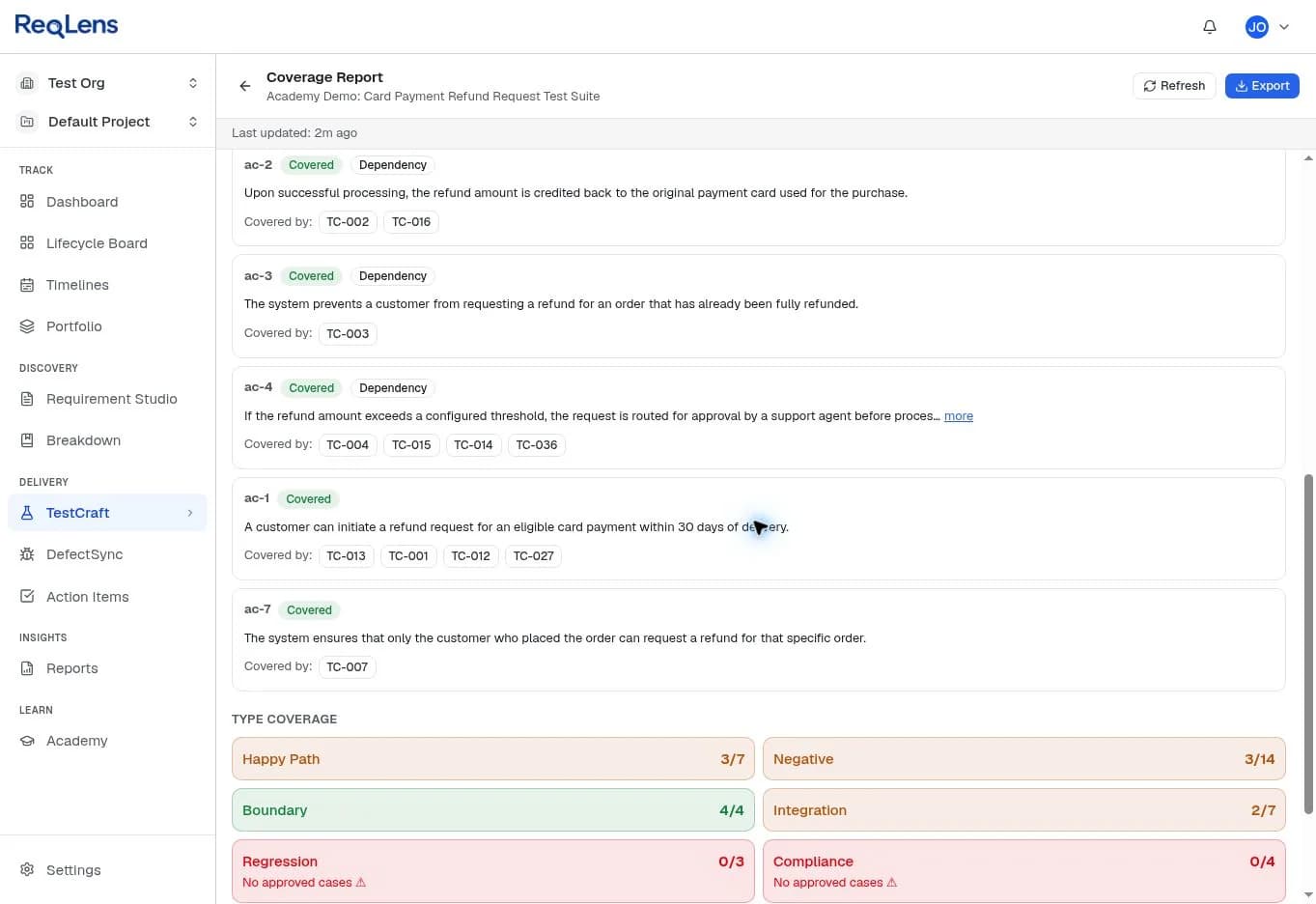
Because every case names the criterion it is designed to test, coverage is read from the links rather than estimated. The coverage report lists each criterion with its approved cases, and type coverage shows which kinds of testing are still missing. In the refund sample, all four boundary cases were approved, while regression and compliance had no approved cases.
Exports and integrations
Export approved cases to the tools your team already uses
Approved suites export to Excel, CSV, TestRail, Xray and Zephyr, and as Gherkin .feature files. Gherkin export gives your team scenarios to build on; it is not executable test automation. On the Free plan the Excel export is watermarked, and full exports are included on Pro and Team.
Requirements can also come from Jira or Azure DevOps, with each completed run's result summary pushed back to the linked work item. See how the Jira and Azure DevOps connectors work, and how ReqLens manages the requirements behind the tests.
Who it is for
One suite, read by the four roles that ship the requirement
QA Engineers
Start test design from a reviewable draft suite instead of a blank page, with test data and boundaries proposed for each criterion.
Business Analysts
See quickly whether the acceptance criteria are specific enough to test, before development starts.
Product Owners
See which criteria have approved tests and which still need a decision or a case.
Delivery Managers
Read coverage per criterion and per test type before a release decision, not after it.
Pricing
Start free, upgrade when your backlog grows
Every plan runs the same requirement-to-release workflow. Plans differ in volume, integrations, exports and team features.
Free
$0 forever, sign-up required
- The full chain, capped monthly: 5 elaborations, 3 decomposition runs, 3 TestCraft suites
- Full test run tracking and DefectSync
- View-only traceability matrix and watermarked Excel export
Pro
$19 per month, or $190 per year
- Higher monthly limits: 50 elaborations, 30 decomposition runs, 30 TestCraft suites
- Jira and Azure DevOps import with result push-back
- Full exports to CSV, Excel, TestRail, Xray and Zephyr, plus test data generation
Team
$10 per seat per month, or $100 per seat per year, from 2 seats
- Everything in Pro for every member, with shared monthly limits
- One workspace for Product Owners, Business Analysts, QA Engineers and Delivery Managers
- Roles and permissions per project
See the full plan comparison for every limit, history and support detail.
Buyer questions
Questions about generating test cases with ReqLens
Is the ReqLens AI test case generator free to use?
Yes, with a free account. Sign-up is required, and the Free plan includes 3 TestCraft suites per month with a watermarked Excel export.
Pro costs $19 a month and includes 30 TestCraft suites per month, full exports and test data generation. Team gives every member the same in one shared workspace.
What does TestCraft need as input?
A requirement with acceptance criteria. TestCraft generates against the criteria rather than the raw requirement text, so each case can name the criterion it is designed to test.
If you only have a rough requirement, paste it into Requirement Studio first. It proposes numbered acceptance criteria for your team to review before any tests are generated.
Does it write automated test scripts?
No. TestCraft generates manual test cases with preconditions, numbered steps, expected results and test data, which your team can run in TestExecute or export.
Gherkin .feature export gives you scenarios to build on in your own tooling; it is not executable test automation. Turning an approved case into an automated script is on the roadmap, not shipped.
How do I know the generated cases cover my requirement?
Every case records the acceptance criterion it is designed to test. The coverage report lists each criterion with the approved cases linked to it, so a criterion with no approved case is visible rather than assumed.
Type coverage shows which kinds of test exist for the suite, such as boundary, negative or regression, so missing kinds of testing stand out too.
Can we use the generated test cases without reviewing them?
You should not, and ReqLens does not assume you will. Every generated case starts as a draft and is approved, edited or rejected case by case.
Review catches what generation cannot know: specifics it filled in, such as a threshold or a screen name, expected results that allow two outcomes, and cases generated from criteria that do not belong to the requirement.
Which formats can we export to?
Approved suites export to Excel, CSV, TestRail, Xray and Zephyr, and as Gherkin .feature files. Draft and rejected cases are left out of exports.
On the Free plan the Excel export is watermarked. Full exports are included on Pro and Team.
Generate a test suite from one of your own requirements
Sign-up required. The Free plan includes 3 TestCraft suites per month.
Want the method first? Read how to generate test cases from requirements.