Requirements management software
Requirements management software that connects requirements, acceptance criteria and test evidence
ReqLens turns rough requirements into reviewable acceptance criteria, checks readiness before approval, and links every generated test case to the acceptance criteria it is designed to test, with results and defects traced back to the requirement. One workspace for product, analysis, QA and delivery.
Free plan available. Sign-up required, no credit card.
Who it is for
Built for the four roles that take a requirement to release
Everyone works on the same requirement rather than four copies of it, with every action recorded against the person who took it.
Product Owners
See what still needs resolving before committing a requirement to delivery.
Business Analysts
Turn briefs and rough stories into structured requirements with numbered acceptance criteria, features and use cases with alternate flows.
QA Engineers
Design tests from approved criteria. Each generated case records the criterion it verifies, so coverage is measured rather than estimated.
Delivery Managers
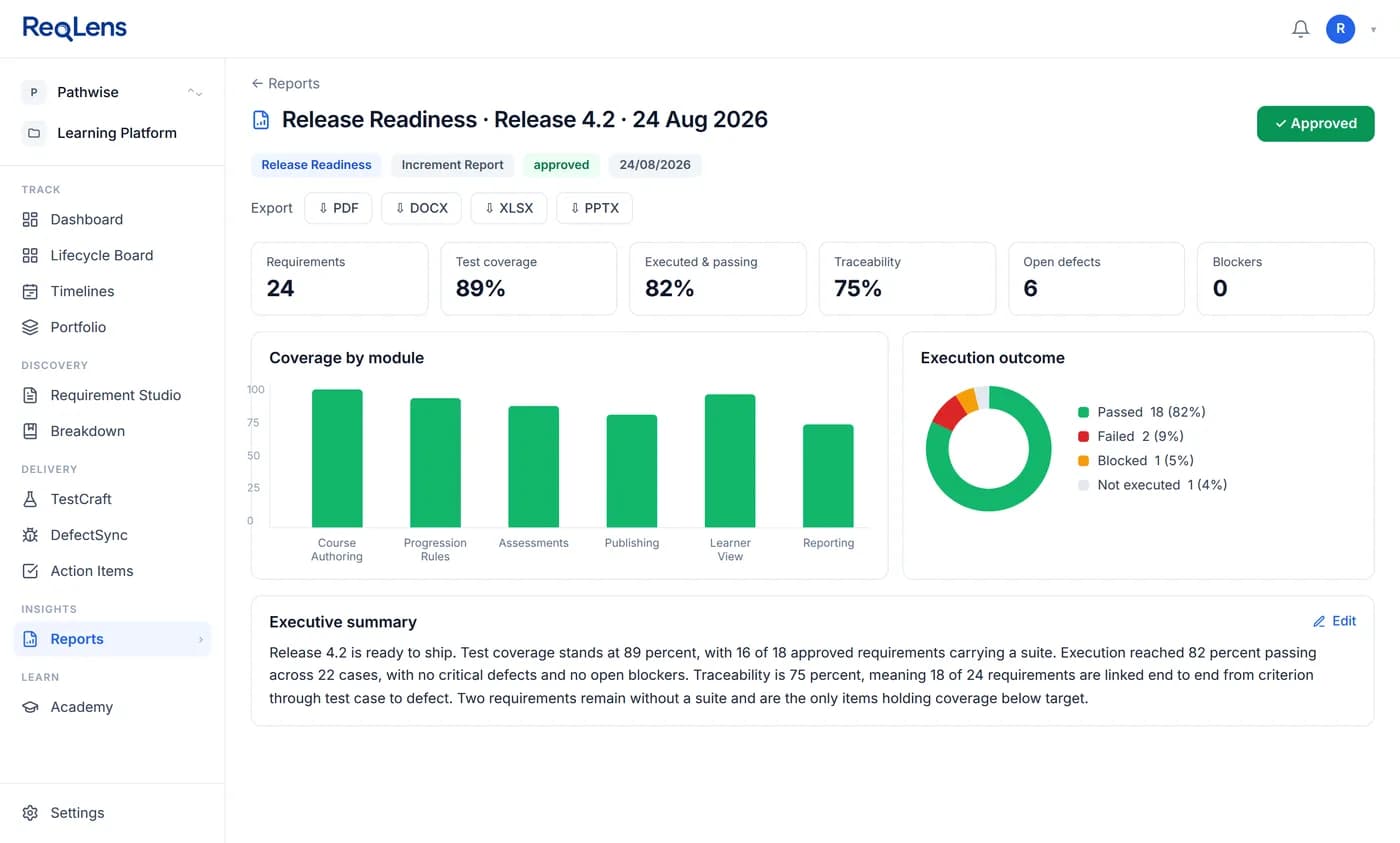
Make the release call from coverage, execution results and open defects in one report, traced back to the requirements they affect.
Requirement to criteria
From a rough requirement to criteria your team can review
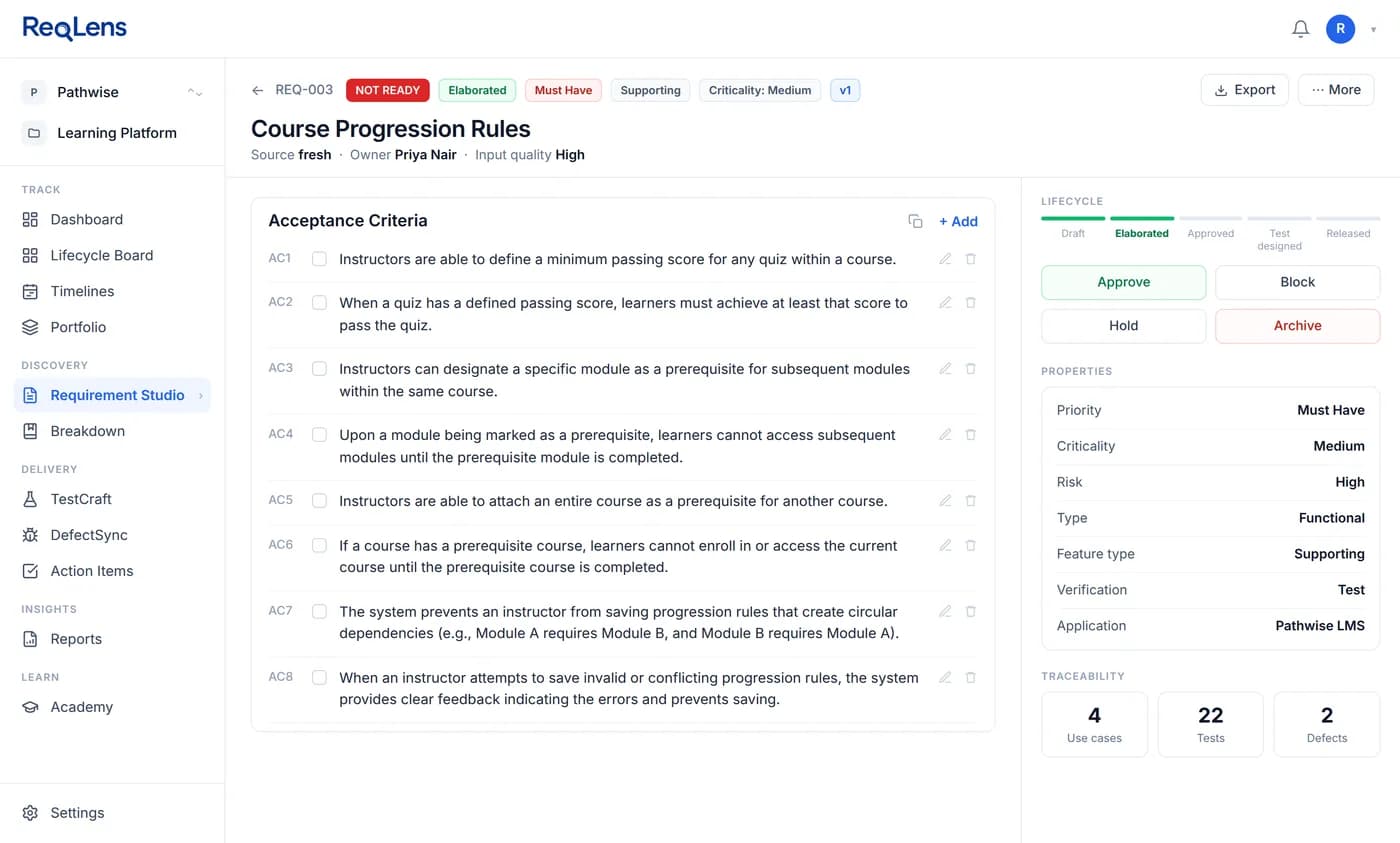
Paste a requirement, import one from Jira or Azure DevOps, or start from a brief that ReqLens breaks into features with priority and dependencies. Requirement Studio elaborates it into context, scope, actors, risk and numbered acceptance criteria, and tells you how much it had to work with.
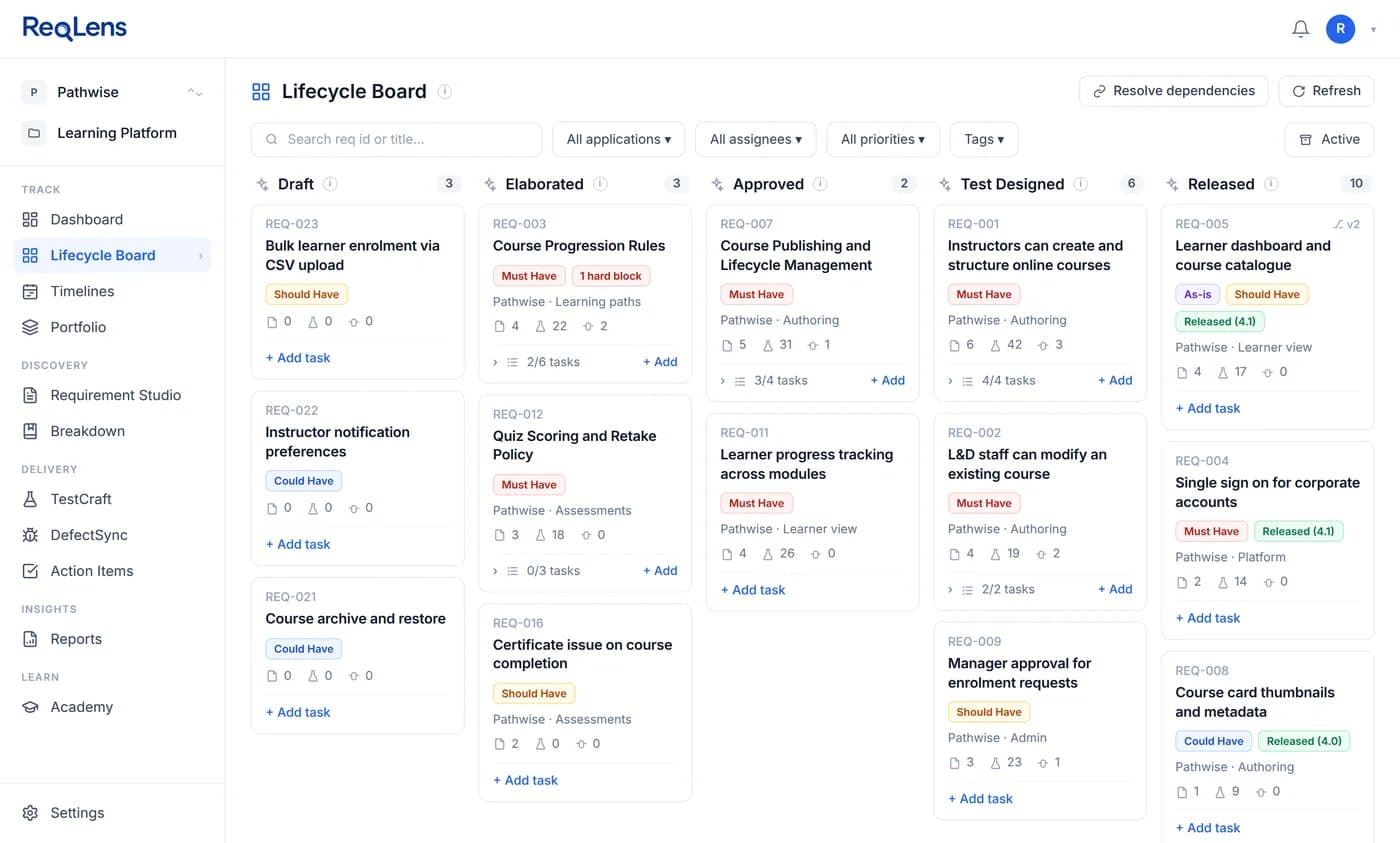
Vague or untestable criteria carry a review flag stating the issue, a suggested fix and a severity. The Product Owner accepts the fix, edits the criterion or records why it stands. Nothing is applied until a person approves it, and approved requirements move through a visible lifecycle from draft to released.
New to writing them? See acceptance criteria examples and a reusable template.
Readiness and decisions
Find the gaps before approval, and record who decided what
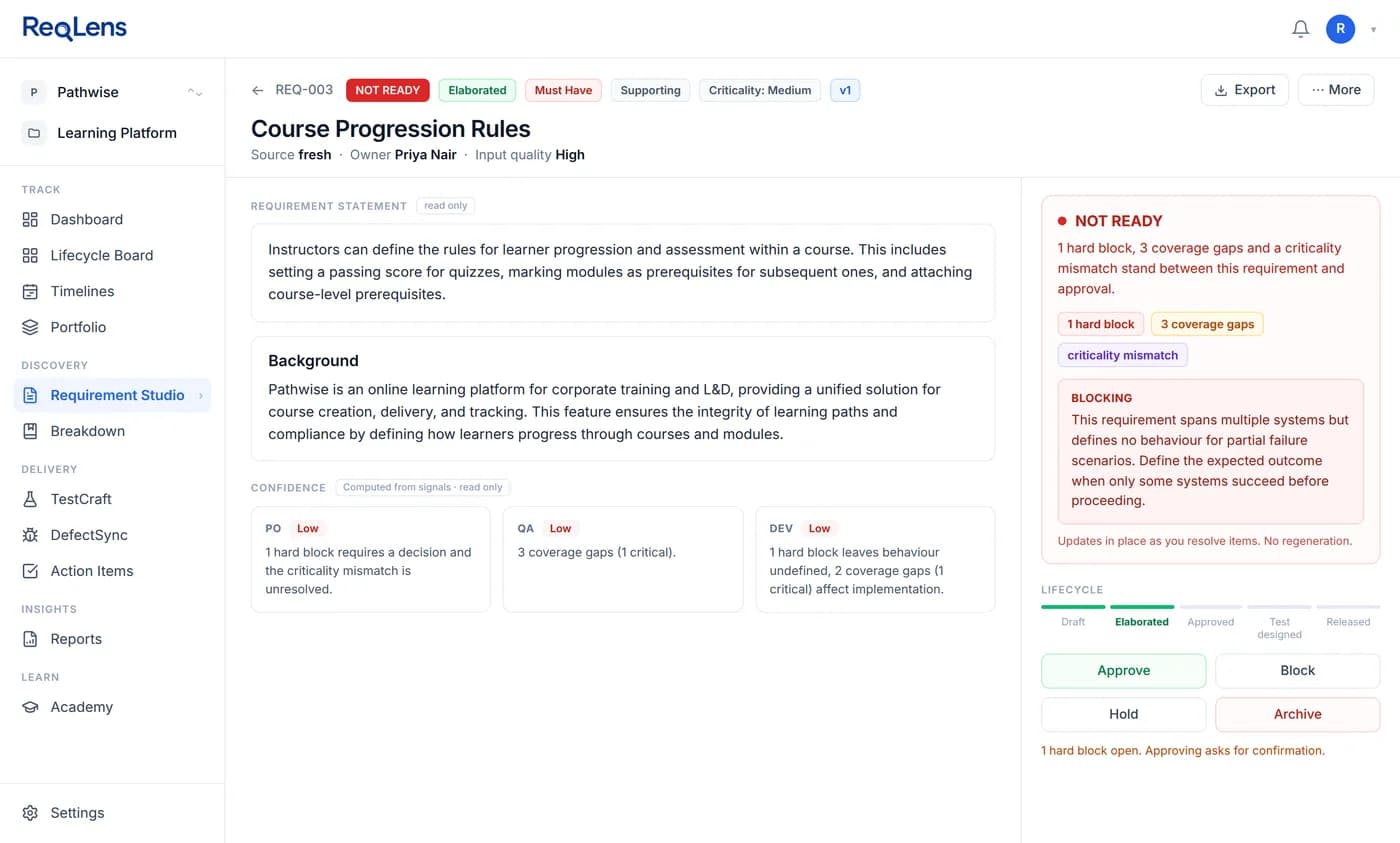
Every requirement gets a readiness verdict before approval. A NOT READY verdict names the blocking items and carries separate confidence ratings for product, QA and engineering, so the team can see which part of the requirement is weak.
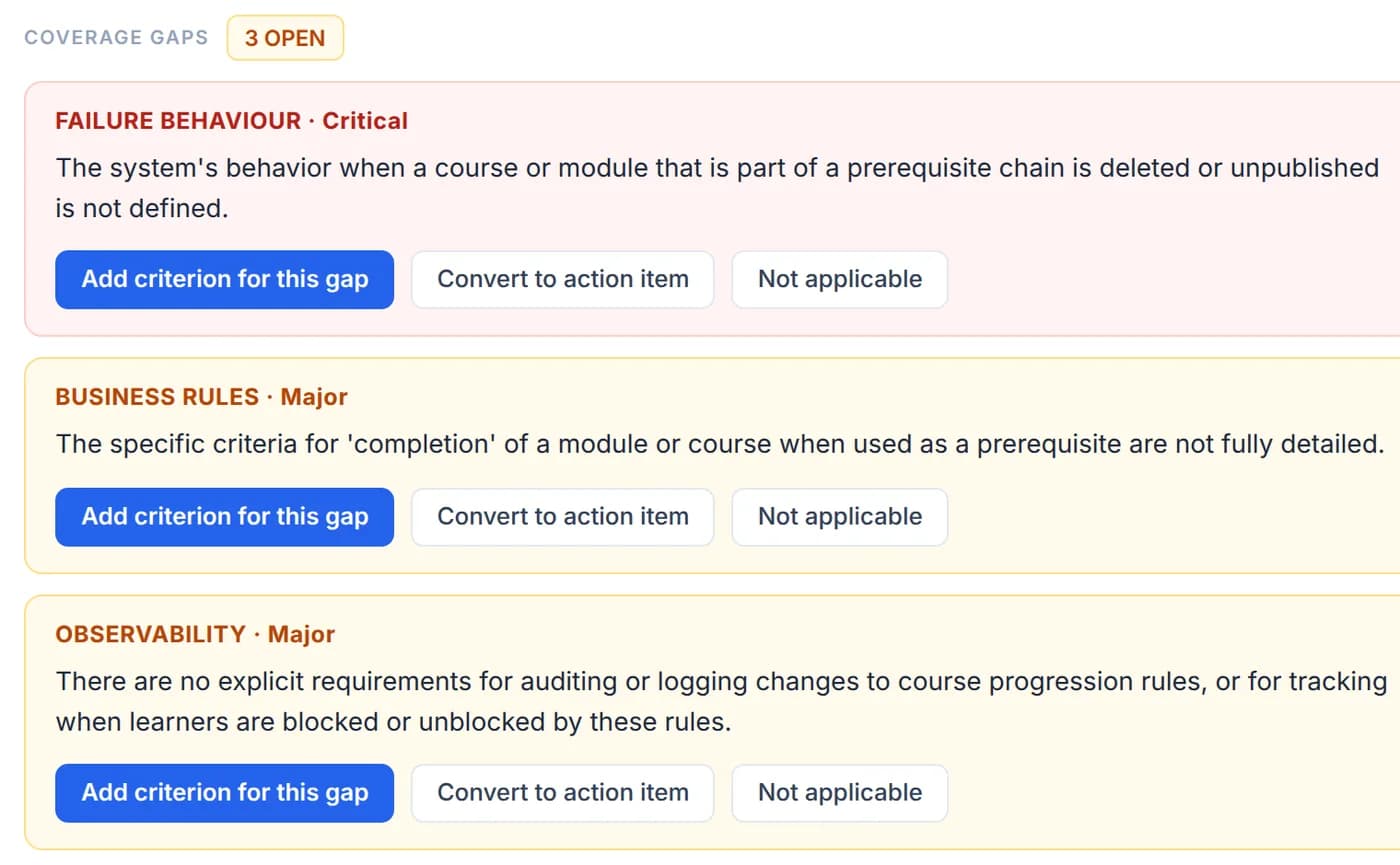
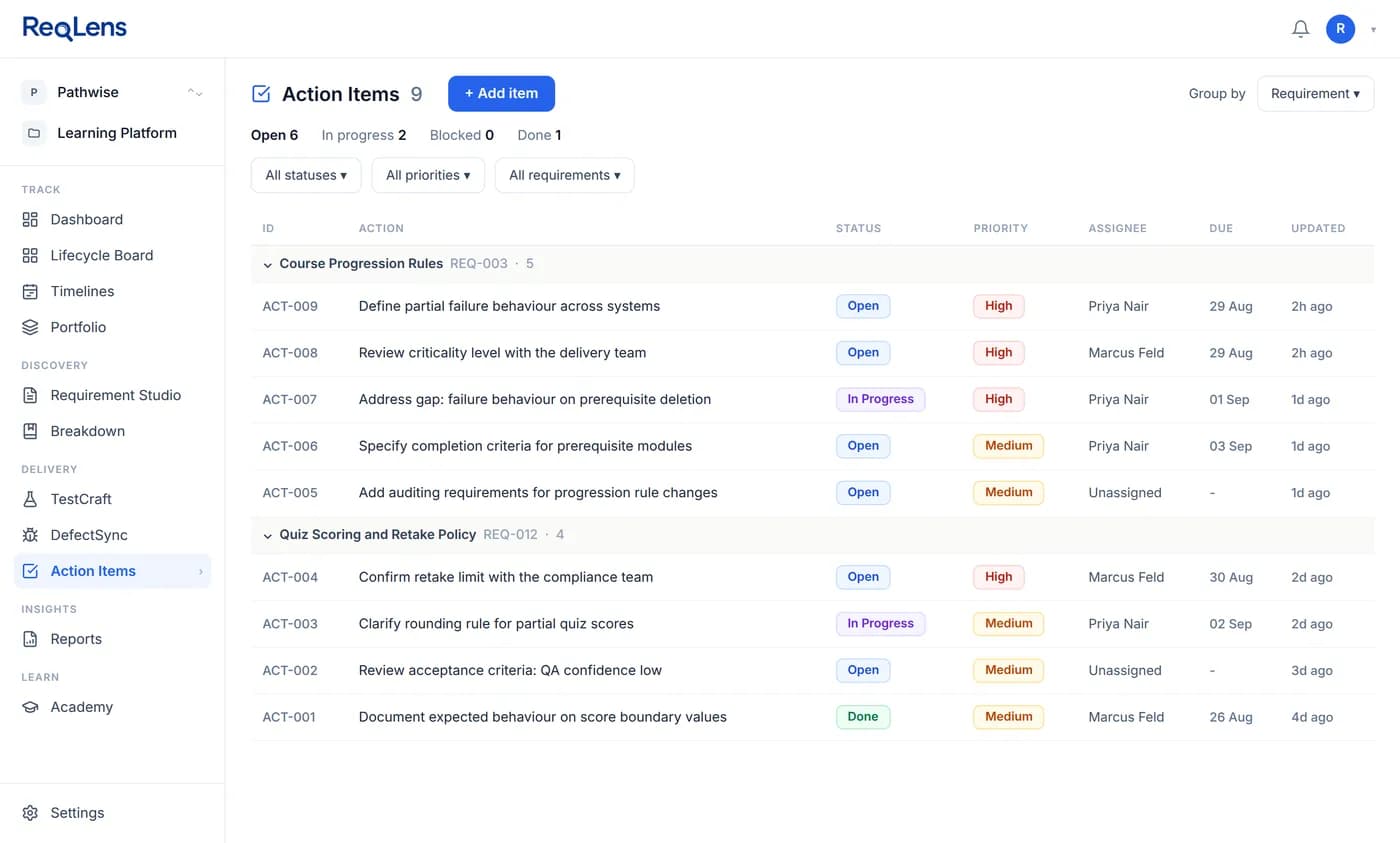
Coverage gaps are grouped by theme, such as failure behaviour, business rules and observability, and each has a severity. Every gap is resolved by a decision: add a criterion, convert it to an action item with an owner, priority and due date, or mark it not applicable.
Tests, runs and defects
Test cases linked to the criteria they are designed to test
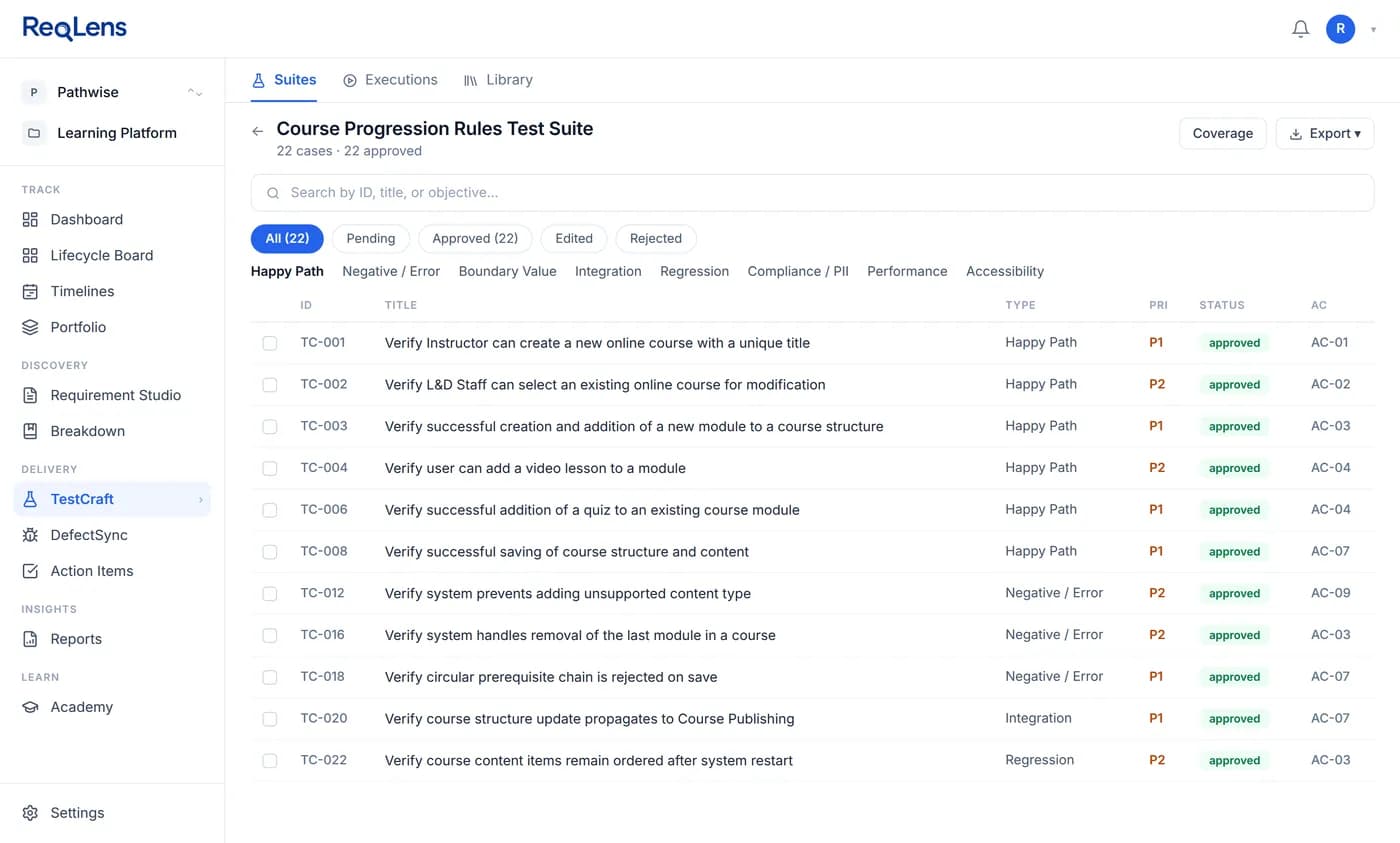
TestCraft generates test cases against approved acceptance criteria rather than the raw requirement text. Each case carries steps, expected results and the criterion it verifies, and stays a draft until someone approves, edits or rejects it.
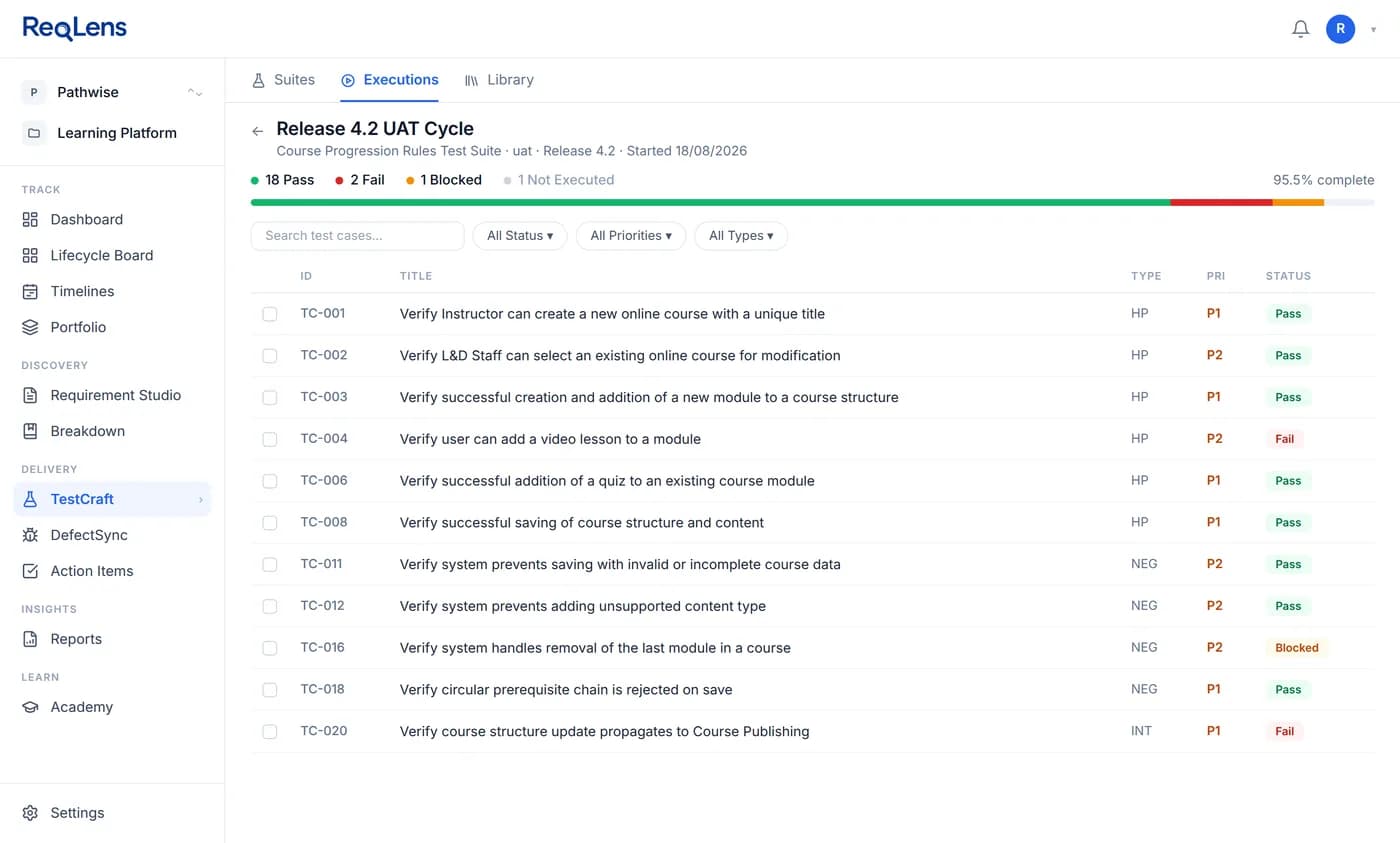
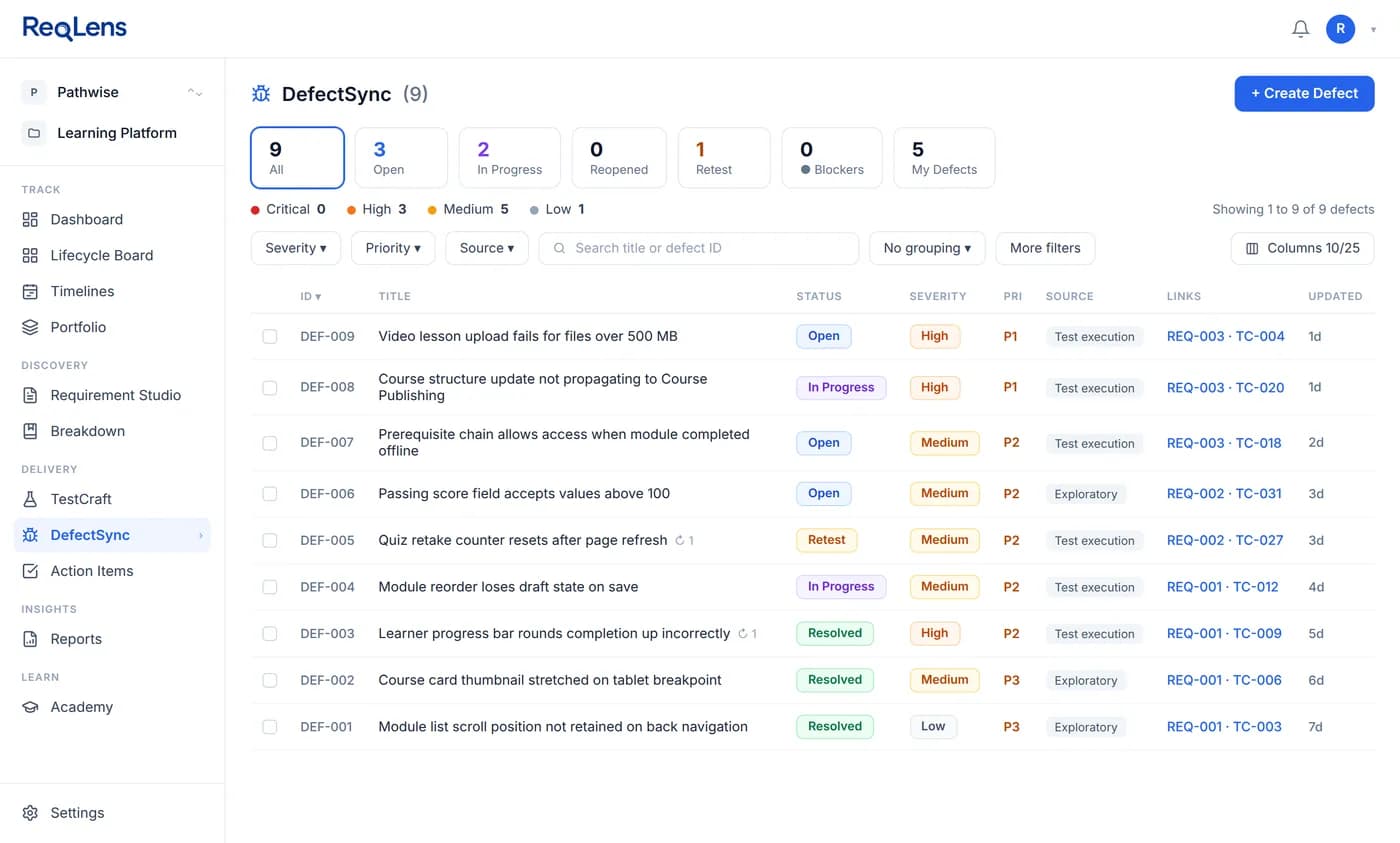
Approved cases run in TestExecute with a status per case. A failed case becomes a DefectSync defect linked back to the case and the requirement, with severity and priority held as separate fields. The test case generation guide walks through one requirement end to end, and the AI test case generator shows the real suite, its review and its exports.
Traceability and change
Requirements traceability that stays current when requirements change
Because every case is generated against a criterion and every defect is raised from a failed case, the links from requirement to criteria, tests, results and defects exist before anyone records them. The requirements traceability matrix is a view over that data rather than a spreadsheet to maintain by hand.
When an approved requirement changes, the edit applies where you made it, and ReqLens flags the affected sections and downstream work for review instead of silently rewriting it. Version history keeps the previous state, so a change can be understood and not just observed.
On Pro and Team, the matrix is exportable and every report type is available, including release readiness. Read how to build a traceability matrix people actually use.
Integrations and exports
Keep Jira or Azure DevOps. Add the requirements layer.
Import requirements and work items from Jira or Azure DevOps, elaborate and test them in ReqLens, and push each completed run's result summary back to the linked work item as one maintained comment. It is a one-way import plus a targeted result comment, not a continuous two-way sync, so neither system overwrites the other.
Approved suites export to CSV, Excel, TestRail, Xray and Zephyr, and as Gherkin .feature files. Gherkin export gives your team scenarios to build on; it is not executable test automation. Integrations and full exports are included on Pro and Team; the free plan includes a watermarked Excel export. See how the Jira and Azure DevOps connectors work.
Pricing
Start free, upgrade when your backlog grows
Every plan runs the same requirement-to-release workflow. Plans differ in volume, integrations, exports and team features.
Free
$0 forever, sign-up required
- The full chain, capped monthly: 5 elaborations, 3 decomposition runs, 3 TestCraft suites
- Full test run tracking and DefectSync
- View-only traceability matrix and watermarked Excel export
Pro
$19 per month, or $190 per year
- Higher monthly limits: 50 elaborations, 30 decomposition runs, 30 TestCraft suites
- Jira and Azure DevOps import with result push-back
- Full exports to CSV, Excel, TestRail, Xray and Zephyr, plus test data generation
Team
$10 per seat per month, or $100 per seat per year, from 2 seats
- Everything in Pro for every member, with shared monthly limits
- One workspace for Product Owners, Business Analysts, QA Engineers and Delivery Managers
- Roles and permissions per project
See the full plan comparison for every limit, history and support detail.
Buyer questions
Questions teams ask before choosing ReqLens
Is ReqLens a requirements management tool or a test management tool?
It is a requirements management tool that carries each requirement through to test evidence. Requirements are held as structured artifacts with numbered acceptance criteria, a readiness verdict and version history, and the same workspace designs tests against those criteria, runs them and records defects.
If your team already runs a test management tool, you can use ReqLens for the requirements half and export approved suites to TestRail, Xray, Zephyr, Excel or CSV.
Do we have to move our backlog out of Jira or Azure DevOps?
No. You import work items from Jira or Azure DevOps, elaborate and test them in ReqLens, and push each completed run's result summary back to the linked work item as one maintained comment.
It is a one-way import plus a targeted result comment, not a continuous two-way sync. Jira and Azure DevOps import and push-back are included on the Pro and Team plans.
What can we do on the free plan?
The free plan runs the full chain with monthly caps: 5 requirement elaborations, 3 decomposition runs and 3 TestCraft suites, with full test run tracking and full DefectSync.
It includes a view-only traceability matrix, a watermarked Excel export and 30 days of history. Integrations, full exports, test data generation and unlimited reports are on Pro and Team.
Does the AI change our requirements without review?
No. ReqLens proposes, and a person decides. Elaboration output, flagged criteria and generated test cases stay drafts until someone approves, edits or rejects them.
Coverage gaps are resolved by an explicit decision: add a criterion, convert the gap to an assigned action item, or mark it not applicable. When an approved requirement is edited, affected downstream work is flagged for review rather than silently rewritten.
How is the Team plan different from Pro?
Pro is for one person and costs $19 a month or $190 a year. Team gives every member everything in Pro inside one shared workspace, with shared monthly limits, shared requirements, use cases, suites and reports, and roles and permissions per project.
Team costs $10 per seat per month or $100 per seat per year, starts at two seats, and seats can be added or removed at any time with proration.
Can we evaluate ReqLens with one of our own requirements?
Yes. Create a free account, paste a real requirement from your backlog, and review the acceptance criteria, readiness verdict and coverage gaps ReqLens returns. Then generate a test suite against the approved criteria.
If you are comparing several tools, the requirements tool evaluation checklist in the ReqLens Academy gives you the same questions to ask of each one.
Try ReqLens on a requirement from your own backlog
Free to start. See the criteria, readiness verdict and gaps ReqLens finds in a real requirement.
Still comparing tools? Use the requirements tool evaluation checklist.